
Table of Contents

More in Agency

Mobile App Design

No items found.

Marketing Advice

No items found.

Customer Marketing

No items found.

Demand Generation

No items found.

Corporate Marketing

No items found.

Creative Agency

No items found.

Augmented Reality

No items found.

ecommerce Design

No items found.

Social Media Marketing

No items found.

Industry Design

No items found.

Content Marketing

No items found.

Video Marketing

No items found.

Industry Marketing

No items found.

Design Services

No items found.

Jacob Cass

No items found.

eCommerce

No items found.

Financial Services

No items found.

Video Production

No items found.

Package Design

No items found.

OpenAI

No items found.

Web3

No items found.

Logo Design

No items found.

ChatGPT

No items found.

Digital Marketing

No items found.

Artificial Intelligence

No items found.

Creative Directors

No items found.

Trade Show

No items found.

Designity

No items found.

Recession

No items found.

Law Firm

No items found.

Freelance

No items found.

Motion Graphics

No items found.

Comparison

No items found.

In-House Teams

No items found.

Website Design

No items found.

Branding

No items found.

99Designs

No items found.

Staffing Agency

No items found.

Cryptocurrency

No items found.

Healthcare Design

No items found.

SaaS Design

No items found.

Blockchain

No items found.

Business Collateral Design

No items found.

Creative Teams

No items found.

Freelance Marketplace

No items found.

Creative Advice

No items found.

NFTs

No items found.

Graphic Design

No items found.

Copywriting

No items found.

Virtual Reality

No items found.

Team Building

No items found.

Agency

cta-h-an
cta-g-an
cta-f-an
cta-e
cta-d
cta-c
cta-b
cta-a

About Designity

Designity is a Creative-as-a-Service partner for marketing and creative leaders who need high-quality creative without the overhead of agencies or in-house teams. With top 1% creatives and marketers, Creative Director-led support, and flexible monthly plans, it’s a more cost-efficient way to scale.
Book a Demo Call
Get Insights From Designity
Your Designity creative team, against a yellow blog background.
About Designity
Designity is a virtual, on-demand creative and marketing agency that has been delivering flexible, scalable Creative-as-a-Service (CaaS) solutions since 2015. Each plan gives you instant access to an expert team made up of the top 1% fully vetted creatives and marketers, all led by a designated Creative Director, and supported by expert Project Managers and Marketing Strategists.

With 100+ services plus a brand-trained AI assistant to boost workflow efficiency, Designity gives you faster, more affordable results than traditional agencies or in-house teams. It’s everything you need to streamline your creative process and hit your marketing goals — on time, on budget, and always on brand.
Blog > Agency > Graphic Design > 6 Expert-Tested Midjourney Prompts (Use Cases + Examples)

6 Expert-Tested Midjourney Prompts (Use Cases + Examples)

·
11
min read
August 15, 2026
Guide to Midjourney prompts by Designity
?
TL;DR
  • Good Midjourney prompts work like mini creative briefs. Use composition, lighting, mood, materials, and context to guide stronger visual results.
  • This guide gives creatives six prompt frameworks. Use them for product photos, lifestyle scenes, editorial concepts, visual metaphors, characters, and branded spaces.
  • Start with clear direction, then adapt. Replace bracketed details with your own subject, style, framing, lighting, and project context.
  • Specific prompts help avoid generic AI images. Describe what the image should communicate, how it should feel, and where it will be used.
  • Parameters give you more creative control. Test aspect ratio, stylization, chaos, negative prompts, and references to refine the output.
  • Designity helps creatives turn AI prompts into real creative work. Join a creative community where AI supports better ideas, stronger briefs, and real client projects.

Looking for Midjourney prompts that produce more than just pretty pictures? 

This guide gives designers, illustrators, art directors, and brand creatives six practical prompt frameworks for product photography, lifestyle scenes, editorial concepts, visual metaphors, characters, and branded environments. 

Each one is built to help you move from a rough idea to a clearer, more useful visual direction. 

You’ll also learn how to shape prompts like mini creative briefs, using composition, lighting, mood, materials, and context to guide better results.

Let’s get prompting!

How to Use the Midjourney Prompts in This Article

Before we dive in, one quick thing: 

These simple prompts are starting points, not sacred text. 

Replace the words in brackets with details from your own project, then test small changes one at a time, including object, lighting, material, framing, style, or aspect ratio. 

That way, you can see what actually improves the result instead of changing everything at once and hoping Midjourney reads your mind. 

Reference images can help guide appearance, composition, or style, but they still need direction. 

In other words, the prompt should explain what you want the image to become and not what inspired it.

Note: These prompts were written for Midjourney V8.1. Results may vary depending on the version, parameters, reference images, and personalization settings you use.


6 Midjourney Prompts for Creatives Tired of Generic AI Images

Here are six Midjourney prompts, grouped by creative use case so you can quickly find the right starting point for your project: 

1. Midjourney Prompt for Product Photography with Art Direction

This prompt gives your product its main-character moment. 

It’s perfect for moodboards, conceptual campaigns, packaging designs, art direction studies, and composition exploration.

Prompt Template:

A professional studio product photograph of a [product], placed on a [surface material], with [supporting elements], controlled softbox lighting, refined shadows, clear product visibility, elegant composition, contemporary commercial photography --ar 4:5 --stylize 100

Example in Action:

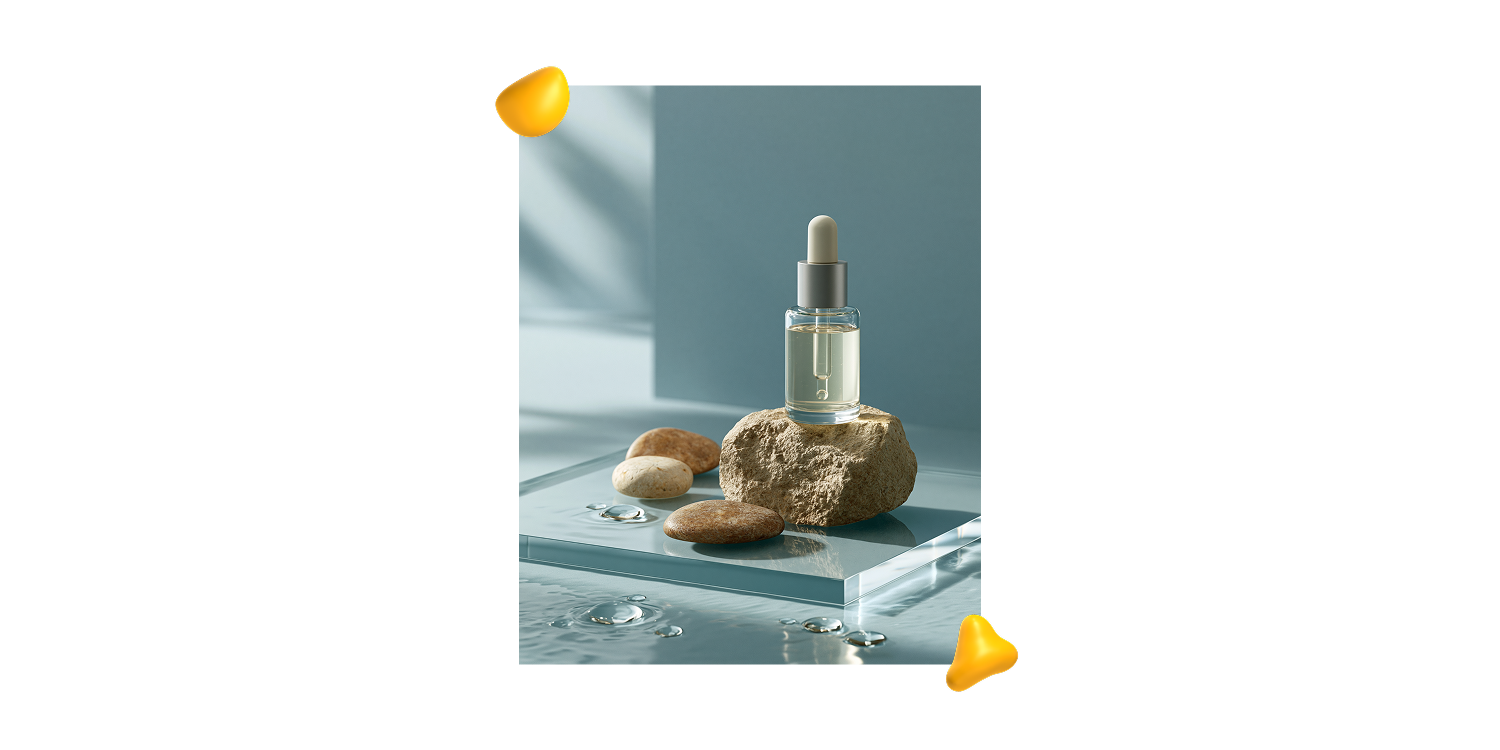
A professional studio product photograph of a minimalist skincare serum bottle, placed on a translucent acrylic surface, with water reflections and smooth stones as supporting elements, controlled softbox lighting, refined shadows, clear product visibility, elegant composition, contemporary commercial photography --ar 4:5 --stylize 100.

How to Adapt this Prompt:

  • For skincare or beauty products, try details such as “stone surface,” “translucent acrylic,” “water reflections,” or “soft neutral palette.”
  • For coffee, chocolate, or food products, experiment with “warm wood,” “linen fabric,” “ceramic cup,” or “morning light.”
  • For technology products, use details like “brushed metal,” “matte black surface,” “subtle gradient background,” or “precise studio lighting.”

Pro Tip:
To turn the image into a use-case scene, replace the opening with:

A realistic lifestyle photograph of a model holding a [product]...

Then add: “natural hand pose, visible product details, soft daylight, authentic but polished brand photography.”

2. Midjourney Prompt for Lifestyle Brand Photography

This prompt helps you create lifestyle scenes that feel specific, believable, and ready for the brand deck. 

Use it for campaign visuals, social content, website imagery, moodboards, and presentations where the setting, behavior, and atmosphere matter just as much as the product.

Prompt Template:

A lifestyle brand photograph of a [workspace, routine, product, or creative scene] in [time of day or context], featuring [main objects or visual elements], [photography style], [composition], [lighting], [mood], [materials or textures], authentic but polished, suitable for [brand use or communication goal] --ar 4:5 --raw --stylize 60.

Example in Action:

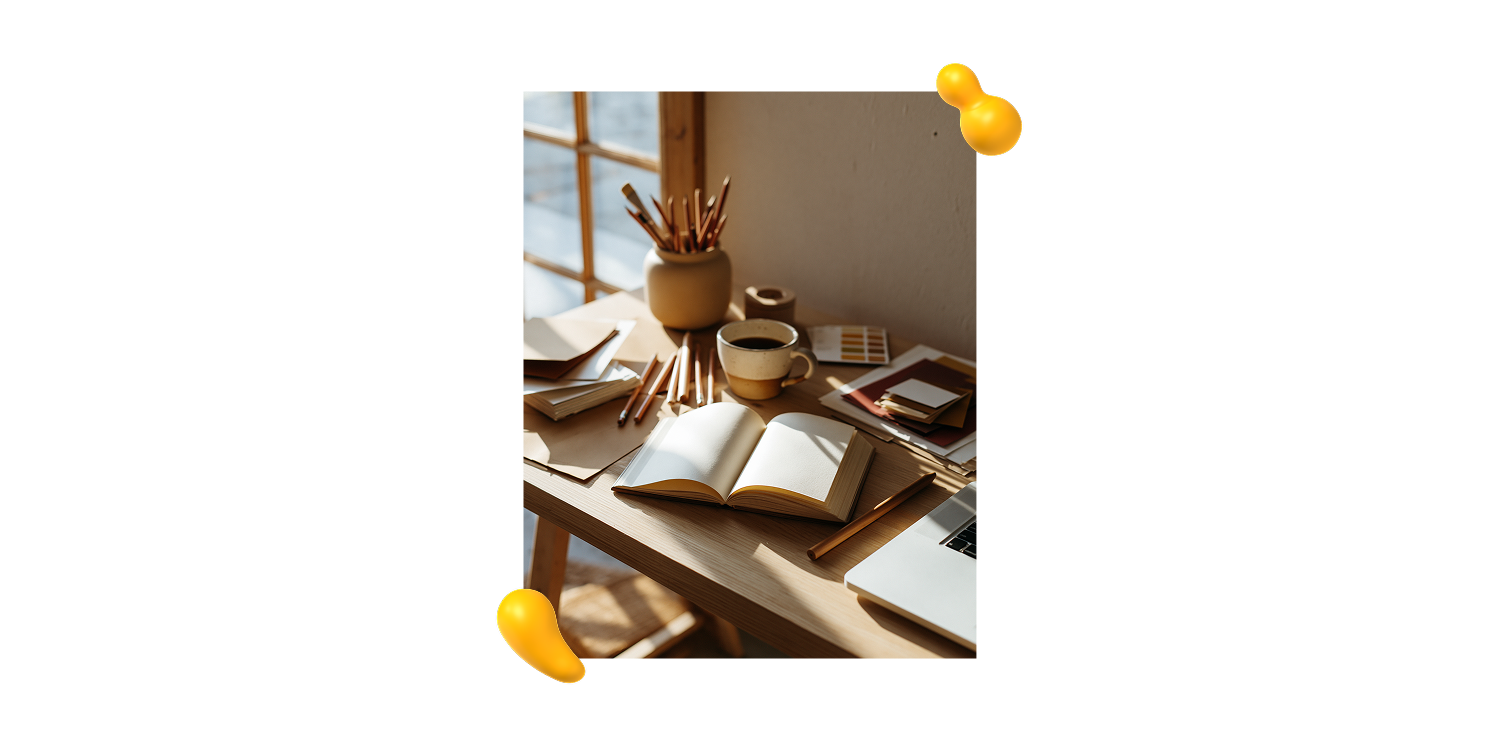
A lifestyle brand photograph of a small creative studio desk in the morning, featuring an open sketchbook, ceramic coffee cup, pencils, paper samples, color swatches, and a laptop partially visible, contemporary documentary-style photography, slightly top-down composition, soft natural window light, calm and focused mood, warm wood textures, subtle creative mess, authentic but polished, suitable for a design studio brand campaign --ar 4:5 --raw --stylize 60.

How to Adapt This Prompt:

Start with a specific moment. Think beyond “brand photo” and describe what is actually happening: a package being opened, a notebook in use, coffee being prepared, or materials laid out before a presentation.

Then shape the visual direction:

  • For an editorial feel, try “contemporary editorial photography,” “documentary-style photography,” or “quiet still life photography.”
  • For a more commercial result, use “polished brand photography” or “premium lifestyle campaign.”
  • For desks and flat surfaces, use a “slightly top-down composition.”
  • For hands, gestures, or products in use, try a “medium close-up.”
  • For layouts that need room for copy, use a “wide composition with negative space.”

Pro Tip:

Specific details make the scene feel real. Paper samples, soft shadows, natural textures, or a laptop sitting just out of frame can add just enough lived-in energy.

3. Midjourney Prompt for Editorial Illustration

This prompt helps turn abstract ideas into visuals people can understand at a glance. 

Use it for articles, newsletters, covers, presentations, and social posts where the image needs to communicate a concept instead of showing something literally.

Prompt Template:

An editorial illustration about [topic or concept], using [visual metaphor], [illustration style], limited color palette, clear focal point, balanced negative space, smart composition, suitable for a magazine article or digital publication --ar 4:3 --stylize 180.
Example in Action:

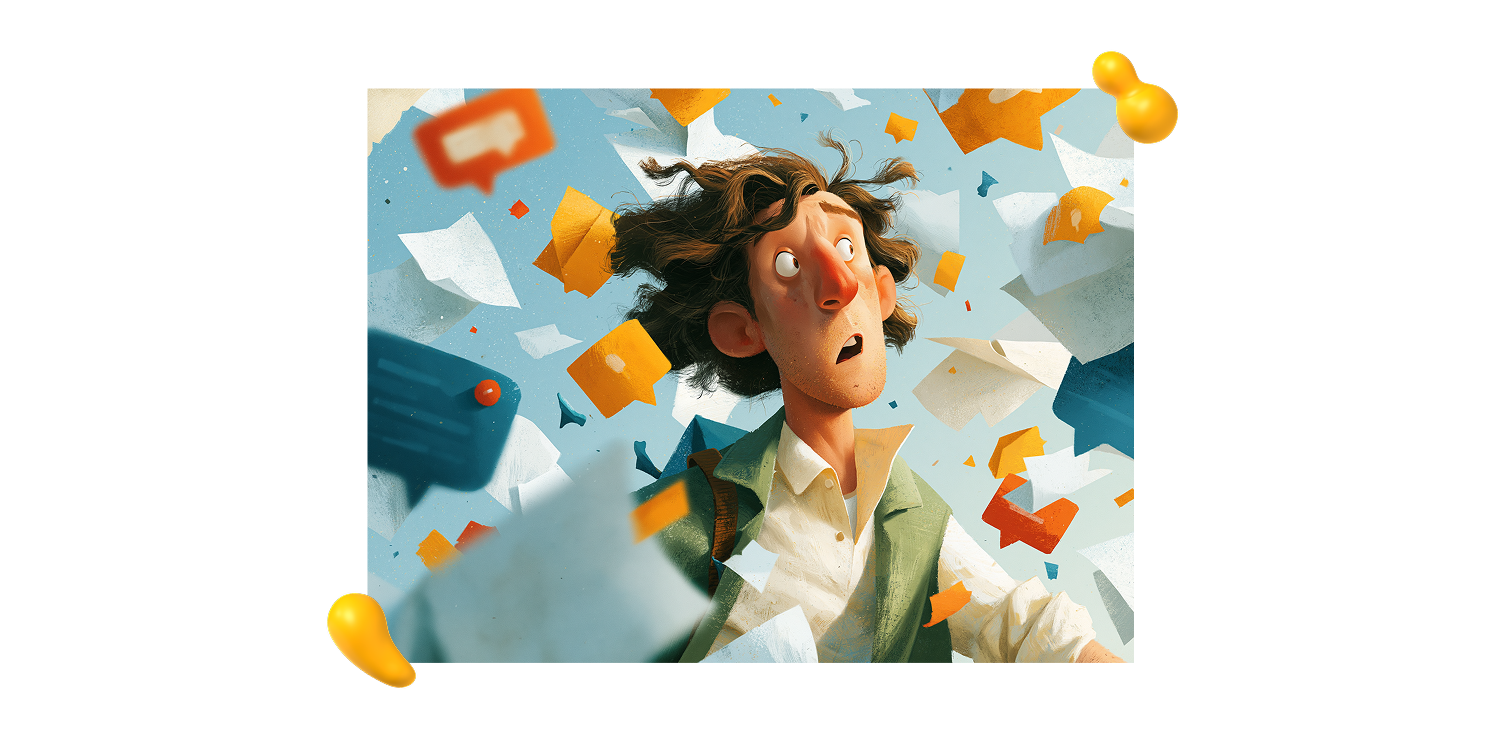
An editorial illustration about information overload, using a visual metaphor of a person trying to organize floating paper fragments and notification shapes, textured digital illustration style, limited color palette, clear focal point, balanced negative space, smart composition, suitable for a magazine article or digital publication --ar 4:3 --stylize 180.


How to Adapt This Prompt:

Start with the idea, then find a visual metaphor that can carry it:

  • Information overload: A person organizing floating paper fragments
  • Creativity: A pencil opening into a small landscape
  • Burnout: A desk slowly turning into a desert
  • Collaboration: Different hands building one abstract structure


Pro Tip:

When the topic feels especially abstract, finish this sentence first:

“This image should communicate…”

Once you know what the image needs to say, turn that message into a visual metaphor. That little step can save you from generating something beautiful, polished, and completely beside the point.


4. Midjourney Prompt for a Photographic Visual Metaphor

This prompt turns abstract ideas into realistic, concept-driven images using objects, light, and composition. Perfect when you want the visual to suggest the idea without spelling it out.

Prompt Template:

A realistic conceptual photograph about [abstract idea], featuring [main object or visual metaphor], [setting or surface], [lighting], [composition], [mood], [photographic style], realistic textures and shadows --ar 4:5 --raw --stylize 65.

Example in Action:

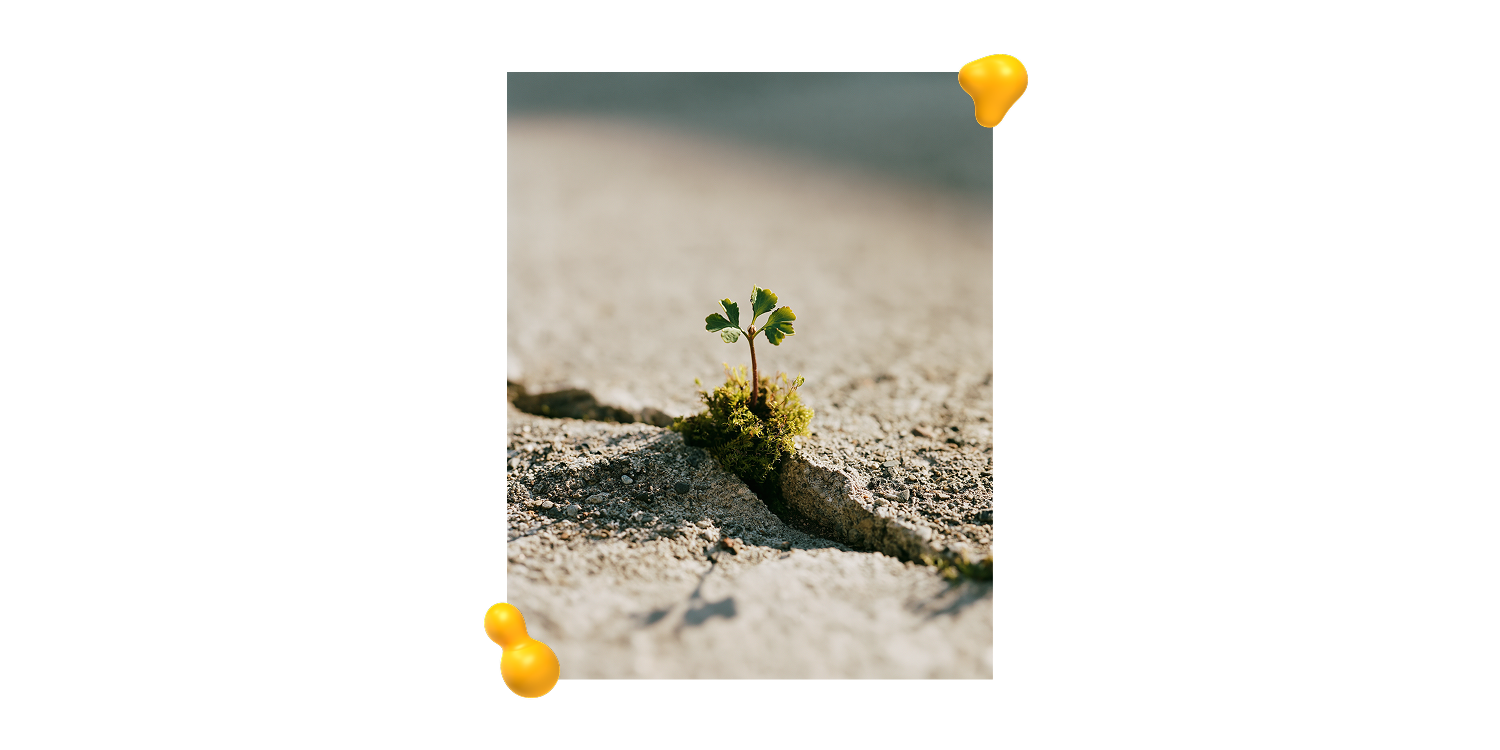
A realistic conceptual photograph about growth, featuring a small green plant emerging through a crack in a concrete surface, soft natural light, close-up composition, quiet hopeful mood, refined documentary-style photography, realistic textures and shadows --ar 4:5 --raw --stylize 65.

How to Adapt This Prompt:

Start with the idea you want the image to communicate, such as growth, change, balance, uncertainty, focus, memory, pressure, or resilience.

Then choose one simple visual metaphor to carry it.

  • Growth: A plant emerging through concrete
  • Balance: A stone resting on the edge of a table
  • Uncertainty: A faint silhouette behind a foggy window
  • Time pressure: A melting ice cube beside a small clock

Keep the scene focused. One strong idea, a few meaningful objects, and a clear visual hierarchy will usually work better than a pile of competing symbols.

Pro Tip:

When the result feels too obvious, soften the metaphor with words like “subtle,” “minimal,” “quiet,” “refined,” or “poetic but realistic.”

When it feels too plain, add more direction through texture, light, or framing, such as “rough concrete surface,” “soft directional light,” “shallow depth of field,” or “close-up composition.”

5. Midjourney Prompt for Character Creation

This prompt helps you shape a character with an actual point of view, including personality, silhouette, visual tone, and all. 

Use it for illustrations, campaigns, editorial work, brand worlds, mascots, or early concept exploration.

Prompt Template:

A character design concept of a [type of character], representing [personality traits], with [signature visual details], expressive silhouette, memorable proportions, clear visual identity, full-body view, polished concept art, suitable for illustration and brand storytelling --ar 2:3 --stylize 150

Example in Action:

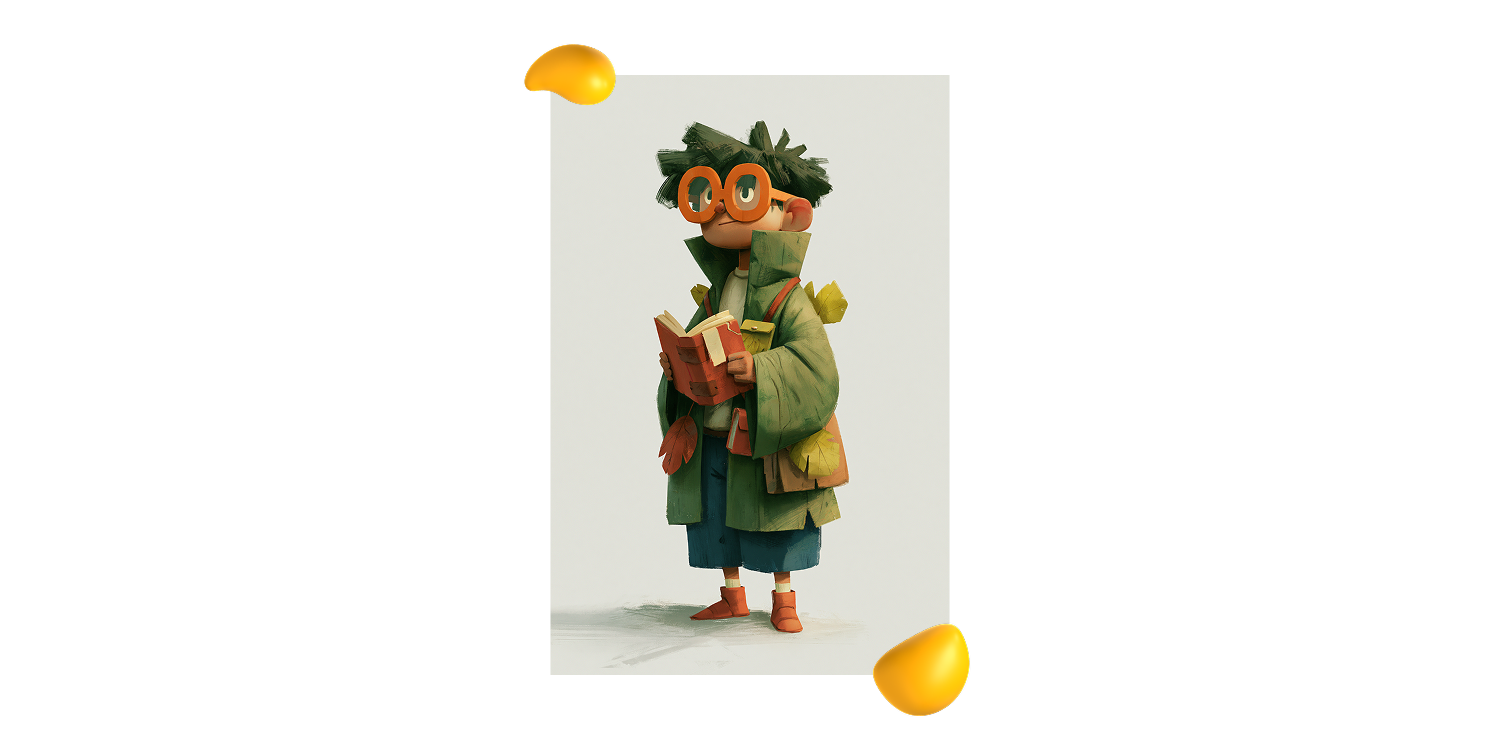
A character design concept of a small curious forest archivist, representing warmth, intelligence, curiosity, and calmness, with oversized glasses, a tiny notebook, leaf-shaped accessories, expressive silhouette, memorable proportions, clear visual identity, full-body view, polished concept art, suitable for illustration and brand storytelling --ar 2:3 --stylize 150.

How to Adapt This Prompt:

Choose personality traits that fit the character’s role:

  • Educational: Curious, warm, clever, approachable
  • Technology-focused: Calm, precise, helpful, slightly futuristic
  • For children: Playful, rounded, expressive, colorful
  • Cultural or artistic: Bold, eccentric, handcrafted, full of personality

Pro Tip:

Text prompts work well for early exploration. Once you choose a direction, add a visual reference to keep the character consistent across poses, scenes, and expressions.

Because a mascot changing face halfway through a campaign is rarely part of the brand strategy.

6. Midjourney Prompt for a Brand Space or Branded Environment
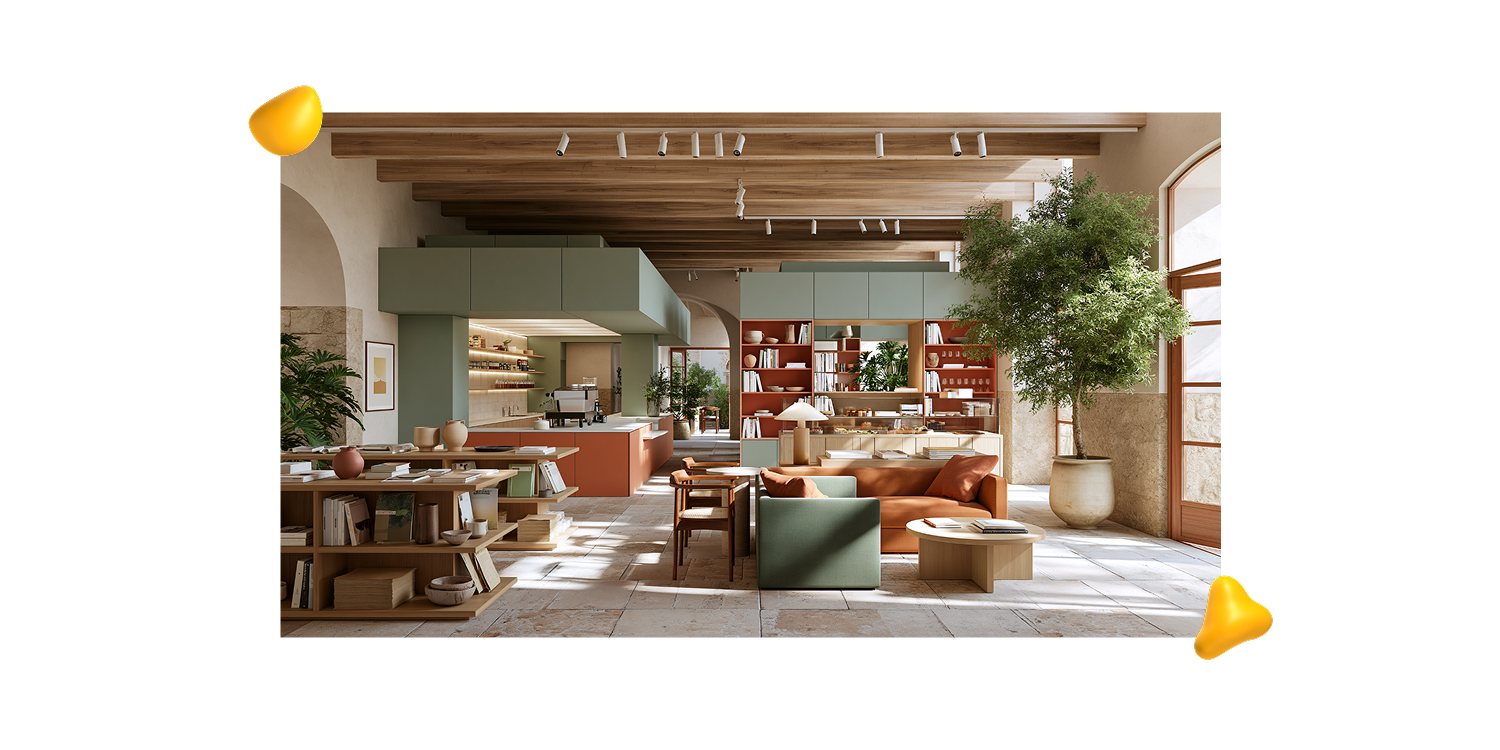
This Midjourney prompt brings the brand off the moodboard and into a space people can actually walk through. 

Use this prompt to explore how its personality translates into materials, lighting, layout, and atmosphere.

Prompt Template:

An interior concept for a [type of space], designed for a [brand personality or audience], using [materials], [color palette], functional layout, atmospheric lighting, realistic architectural photography, thoughtful details, distinctive but usable brand experience --ar 16:9 --stylize 100

Example in Action:

An interior concept for an independent design bookstore and coffee shop, designed for a creative audience, using warm wood, natural stone, ceramic objects, and soft neutral colors, functional layout, atmospheric lighting, realistic architectural photography, thoughtful details, distinctive but usable brand experience --ar 16:9 --stylize 100.

How to Adapt This Prompt:

Shape the environment around the brand personality:

  • Minimalist: Warm neutrals, natural stone, light wood, quiet luxury
  • Young and experimental: Bold colors, modular furniture, playful signage
  • Handcrafted: Imperfect ceramics, local materials, handmade textures
  • Technology-focused: Soft gradients, translucent surfaces, modular lighting

Pro Tip:

Add an action to make the environment feel lived in:

  • People browsing products
  • A designer presenting work to a client
  • Visitors interacting with an installation
  • Customers sitting near a branded display

Get a quick breakdown of how Leonardo AI differs from Midjourney. 

5 Expert Tips for Writing a Good Midjourney Prompt

A good Midjourney prompt doesn’t need to be huge. It’s more about clear creative direction. 

Here are five ways to write prompts that give you more intentional, useful results.

1. Keep Your Midjourney Prompt Clear and Focused

Longer doesn’t always mean better. Prompts can become confusing when they stack too many details without a clear hierarchy.

Focus on the decisions that matter most to the image. A concise prompt with strong direction will often work better than a long one filled with competing ideas.

2. Be Specific to Avoid Predictable AI Images

Image-generation models work with patterns. When your description is vague, Midjourney fills in the gaps with familiar visual associations.

Ask for “a birthday scene,” for example, and you will likely get cake, candles, balloons, and a recognizable party setting, even if you did not request those details.

That’s not always a problem.

But in art direction, branding, illustration, or visual communication, the predictable result is usually just the starting point.

3. Direct the Composition, Lighting, and Mood

AI makes the creative decisions you leave open. It may choose the framing, setting, lighting, materials, level of realism, and overall atmosphere for you.

The more specific your intended result is, the more clearly you should guide those choices. 

Think beyond the subject and describe how the image should look, feel, and function.

4. Follow a Simple Midjourney Prompt Structure

A practical structure for writing a good Midjourney prompt is:

Subject + context + visual style + composition + lighting + mood + important details + parameters

You don’t need to include every element each time.

Use the structure to spot what may be missing and reduce unnecessary room for interpretation.

5. Use Midjourney as Part of Your Creative Process

Midjourney doesn’t need to produce a perfect final image to be valuable.

In a professional workflow, it can support exploration, visualization, mockups, and creative direction.

The output may still need cropping, retouching, compositing, adjustment, or reconstruction in another tool. 

A good Midjourney prompt places the output where it works best: inside a human-led creative process, not in place of creative judgment.

4 Common Mistakes to Avoid When Writing Midjourney Prompts

Even a detailed prompt can miss the mark when the creative direction is unclear. Watch out for these common mistakes:

  • Using generic descriptions: “Beautiful product photo” may look polished, but it leaves Midjourney to define what “beautiful” means.

  • Trying to do too much at once: When every detail feels equally important, the image loses focus. Prioritize the main subject, message, and visual decision.

  • Relying too heavily on negative prompts: Saying “without cake” may still introduce cake. Instead, describe what should take its place.

  • Expecting reference images to explain everything: References can guide style or composition, but you still need to clarify what Midjourney should borrow from them.

{{cd-led-team-an}}


5 Midjourney Parameters and Reference Tools for Better Creative Control

The right parameters can help you shape the format, style, variation, and consistency of your Midjourney images. 

Here are five useful options to test as you refine your creative direction:

1. Use --ar to Set the Aspect Ratio

The --ar parameter controls the image’s proportions. Choose the ratio based on where the visual will appear:

  • Horizontal for banners and presentations
  • Vertical for social posts and portraits
  • Square for thumbnails and flexible visual studies

2. Adjust --stylize to Control Artistic Interpretation

The --stylize parameter determines how much creative freedom Midjourney applies.

Lower values tend to follow the prompt more closely. 

Higher values can produce more expressive results, but they may also move further away from your original direction.

3. Test --chaos to Explore More Variations

The --chaos parameter increases the differences between generated results.

Higher values are useful during early exploration when you want unexpected directions. Lower values work better when consistency matters.

4. Use --no Carefully

The --no parameter can help identify elements you want to avoid, but it should not carry the whole prompt.

Whenever possible, describe what should appear instead.

Positive creative direction usually gives Midjourney more useful guidance than a long list of exclusions.

5. Add References for More Visual Control

Image prompts, style references, and character or object references can help guide appearance, composition, and consistency.

But references don’t replace clear direction. 

The more specific you are about what Midjourney should borrow, such as the palette, texture, pose, or overall mood, the more useful the reference becomes.

Start a Creative Journey That’s Definitely Not Mid at Designity

A good Midjourney prompt is really just a good creative brief in disguise. 

It helps you test ideas faster, explore more directions, and stay in control of the choices that matter.

That’s how we think about AI at Designity. It supports the process without replacing your judgment, taste, or craft.

As part of our creative community, you’ll work on real client projects, collaborate with experienced Creative Directors, and use AI to bring strong ideas to life faster.

And it gets even better. 

At Designity, you don’t need to chase clients, hunt for projects, or follow up on invoices.

Think you can turn a Midjourney prompt into a real creative point of view?

Join Designity’s creative community and put your prompting skills to work on real client briefs.

Share this post:

Designity blog promotional graphic
decorative-image
decorative-image
decorative-image
Designity blog promotional graphic
6 Expert-Tested Midjourney Prompts (Use Cases + Examples)
About the Author:
Larissa Damasceno
Larissa is a multidisciplinary graphic designer, illustrator, and design educator with over seven years of experience across brand, illustration, and digital/UI design. Her work turns ideas into thoughtful visual systems, digital experiences, and meaningful creative solutions.
Have a collab or partnership in mind? Reach out at marketing@designity.com
Blog > Agency > Graphic Design > 6 Expert-Tested Midjourney Prompts (Use Cases + Examples)

6 Expert-Tested Midjourney Prompts (Use Cases + Examples)

·
11
min read
August 15, 2026
Guide to Midjourney prompts by Designity
Table of Contents
?
TL;DR
  • Good Midjourney prompts work like mini creative briefs. Use composition, lighting, mood, materials, and context to guide stronger visual results.
  • This guide gives creatives six prompt frameworks. Use them for product photos, lifestyle scenes, editorial concepts, visual metaphors, characters, and branded spaces.
  • Start with clear direction, then adapt. Replace bracketed details with your own subject, style, framing, lighting, and project context.
  • Specific prompts help avoid generic AI images. Describe what the image should communicate, how it should feel, and where it will be used.
  • Parameters give you more creative control. Test aspect ratio, stylization, chaos, negative prompts, and references to refine the output.
  • Designity helps creatives turn AI prompts into real creative work. Join a creative community where AI supports better ideas, stronger briefs, and real client projects.

Looking for Midjourney prompts that produce more than just pretty pictures? 

This guide gives designers, illustrators, art directors, and brand creatives six practical prompt frameworks for product photography, lifestyle scenes, editorial concepts, visual metaphors, characters, and branded environments. 

Each one is built to help you move from a rough idea to a clearer, more useful visual direction. 

You’ll also learn how to shape prompts like mini creative briefs, using composition, lighting, mood, materials, and context to guide better results.

Let’s get prompting!

How to Use the Midjourney Prompts in This Article

Before we dive in, one quick thing: 

These simple prompts are starting points, not sacred text. 

Replace the words in brackets with details from your own project, then test small changes one at a time, including object, lighting, material, framing, style, or aspect ratio. 

That way, you can see what actually improves the result instead of changing everything at once and hoping Midjourney reads your mind. 

Reference images can help guide appearance, composition, or style, but they still need direction. 

In other words, the prompt should explain what you want the image to become and not what inspired it.

Note: These prompts were written for Midjourney V8.1. Results may vary depending on the version, parameters, reference images, and personalization settings you use.


6 Midjourney Prompts for Creatives Tired of Generic AI Images

Here are six Midjourney prompts, grouped by creative use case so you can quickly find the right starting point for your project: 

1. Midjourney Prompt for Product Photography with Art Direction

This prompt gives your product its main-character moment. 

It’s perfect for moodboards, conceptual campaigns, packaging designs, art direction studies, and composition exploration.

Prompt Template:

A professional studio product photograph of a [product], placed on a [surface material], with [supporting elements], controlled softbox lighting, refined shadows, clear product visibility, elegant composition, contemporary commercial photography --ar 4:5 --stylize 100

Example in Action:

A professional studio product photograph of a minimalist skincare serum bottle, placed on a translucent acrylic surface, with water reflections and smooth stones as supporting elements, controlled softbox lighting, refined shadows, clear product visibility, elegant composition, contemporary commercial photography --ar 4:5 --stylize 100.


How to Adapt this Prompt:

  • For skincare or beauty products, try details such as “stone surface,” “translucent acrylic,” “water reflections,” or “soft neutral palette.”
  • For coffee, chocolate, or food products, experiment with “warm wood,” “linen fabric,” “ceramic cup,” or “morning light.”
  • For technology products, use details like “brushed metal,” “matte black surface,” “subtle gradient background,” or “precise studio lighting.”

Pro Tip:
To turn the image into a use-case scene, replace the opening with:

A realistic lifestyle photograph of a model holding a [product]...

Then add: “natural hand pose, visible product details, soft daylight, authentic but polished brand photography.”

2. Midjourney Prompt for Lifestyle Brand Photography

This prompt helps you create lifestyle scenes that feel specific, believable, and ready for the brand deck. 

Use it for campaign visuals, social content, website imagery, moodboards, and presentations where the setting, behavior, and atmosphere matter just as much as the product.

Prompt Template:

A lifestyle brand photograph of a [workspace, routine, product, or creative scene] in [time of day or context], featuring [main objects or visual elements], [photography style], [composition], [lighting], [mood], [materials or textures], authentic but polished, suitable for [brand use or communication goal] --ar 4:5 --raw --stylize 60.

Example in Action:

A lifestyle brand photograph of a small creative studio desk in the morning, featuring an open sketchbook, ceramic coffee cup, pencils, paper samples, color swatches, and a laptop partially visible, contemporary documentary-style photography, slightly top-down composition, soft natural window light, calm and focused mood, warm wood textures, subtle creative mess, authentic but polished, suitable for a design studio brand campaign --ar 4:5 --raw --stylize 60.


How to Adapt This Prompt:

Start with a specific moment. Think beyond “brand photo” and describe what is actually happening: a package being opened, a notebook in use, coffee being prepared, or materials laid out before a presentation.

Then shape the visual direction:

  • For an editorial feel, try “contemporary editorial photography,” “documentary-style photography,” or “quiet still life photography.”
  • For a more commercial result, use “polished brand photography” or “premium lifestyle campaign.”
  • For desks and flat surfaces, use a “slightly top-down composition.”
  • For hands, gestures, or products in use, try a “medium close-up.”
  • For layouts that need room for copy, use a “wide composition with negative space.”

Pro Tip:

Specific details make the scene feel real. Paper samples, soft shadows, natural textures, or a laptop sitting just out of frame can add just enough lived-in energy.

3. Midjourney Prompt for Editorial Illustration

This prompt helps turn abstract ideas into visuals people can understand at a glance. 

Use it for articles, newsletters, covers, presentations, and social posts where the image needs to communicate a concept instead of showing something literally.

Prompt Template:

An editorial illustration about [topic or concept], using [visual metaphor], [illustration style], limited color palette, clear focal point, balanced negative space, smart composition, suitable for a magazine article or digital publication --ar 4:3 --stylize 180.

Example in Action:

An editorial illustration about information overload, using a visual metaphor of a person trying to organize floating paper fragments and notification shapes, textured digital illustration style, limited color palette, clear focal point, balanced negative space, smart composition, suitable for a magazine article or digital publication --ar 4:3 --stylize 180.


How to Adapt This Prompt:

Start with the idea, then find a visual metaphor that can carry it:

  • Information overload: A person organizing floating paper fragments
  • Creativity: A pencil opening into a small landscape
  • Burnout: A desk slowly turning into a desert
  • Collaboration: Different hands building one abstract structure


Pro Tip:

When the topic feels especially abstract, finish this sentence first:

“This image should communicate…”

Once you know what the image needs to say, turn that message into a visual metaphor. That little step can save you from generating something beautiful, polished, and completely beside the point.


4. Midjourney Prompt for a Photographic Visual Metaphor

This prompt turns abstract ideas into realistic, concept-driven images using objects, light, and composition. Perfect when you want the visual to suggest the idea without spelling it out.

Prompt Template:

A realistic conceptual photograph about [abstract idea], featuring [main object or visual metaphor], [setting or surface], [lighting], [composition], [mood], [photographic style], realistic textures and shadows --ar 4:5 --raw --stylize 65.

Example in Action:

A realistic conceptual photograph about growth, featuring a small green plant emerging through a crack in a concrete surface, soft natural light, close-up composition, quiet hopeful mood, refined documentary-style photography, realistic textures and shadows --ar 4:5 --raw --stylize 65.


How to Adapt This Prompt:

Start with the idea you want the image to communicate, such as growth, change, balance, uncertainty, focus, memory, pressure, or resilience.

Then choose one simple visual metaphor to carry it.

  • Growth: A plant emerging through concrete
  • Balance: A stone resting on the edge of a table
  • Uncertainty: A faint silhouette behind a foggy window
  • Time pressure: A melting ice cube beside a small clock

Keep the scene focused. One strong idea, a few meaningful objects, and a clear visual hierarchy will usually work better than a pile of competing symbols.

Pro Tip:

When the result feels too obvious, soften the metaphor with words like “subtle,” “minimal,” “quiet,” “refined,” or “poetic but realistic.”

When it feels too plain, add more direction through texture, light, or framing, such as “rough concrete surface,” “soft directional light,” “shallow depth of field,” or “close-up composition.”

5. Midjourney Prompt for Character Creation

This prompt helps you shape a character with an actual point of view, including personality, silhouette, visual tone, and all. 

Use it for illustrations, campaigns, editorial work, brand worlds, mascots, or early concept exploration.

Prompt Template:

A character design concept of a [type of character], representing [personality traits], with [signature visual details], expressive silhouette, memorable proportions, clear visual identity, full-body view, polished concept art, suitable for illustration and brand storytelling --ar 2:3 --stylize 150

Example in Action:

A character design concept of a small curious forest archivist, representing warmth, intelligence, curiosity, and calmness, with oversized glasses, a tiny notebook, leaf-shaped accessories, expressive silhouette, memorable proportions, clear visual identity, full-body view, polished concept art, suitable for illustration and brand storytelling --ar 2:3 --stylize 150.


How to Adapt This Prompt:

Choose personality traits that fit the character’s role:

  • Educational: Curious, warm, clever, approachable
  • Technology-focused: Calm, precise, helpful, slightly futuristic
  • For children: Playful, rounded, expressive, colorful
  • Cultural or artistic: Bold, eccentric, handcrafted, full of personality

Pro Tip:

Text prompts work well for early exploration. Once you choose a direction, add a visual reference to keep the character consistent across poses, scenes, and expressions.

Because a mascot changing face halfway through a campaign is rarely part of the brand strategy.

6. Midjourney Prompt for a Brand Space or Branded Environment

This Midjourney prompt brings the brand off the moodboard and into a space people can actually walk through. 

Use this prompt to explore how its personality translates into materials, lighting, layout, and atmosphere.

Prompt Template:

An interior concept for a [type of space], designed for a [brand personality or audience], using [materials], [color palette], functional layout, atmospheric lighting, realistic architectural photography, thoughtful details, distinctive but usable brand experience --ar 16:9 --stylize 100

Example in Action:

An interior concept for an independent design bookstore and coffee shop, designed for a creative audience, using warm wood, natural stone, ceramic objects, and soft neutral colors, functional layout, atmospheric lighting, realistic architectural photography, thoughtful details, distinctive but usable brand experience --ar 16:9 --stylize 100.

How to Adapt This Prompt:

Shape the environment around the brand personality:

  • Minimalist: Warm neutrals, natural stone, light wood, quiet luxury
  • Young and experimental: Bold colors, modular furniture, playful signage
  • Handcrafted: Imperfect ceramics, local materials, handmade textures
  • Technology-focused: Soft gradients, translucent surfaces, modular lighting

Pro Tip:

Add an action to make the environment feel lived in:

  • People browsing products
  • A designer presenting work to a client
  • Visitors interacting with an installation
  • Customers sitting near a branded display

Get a quick breakdown of how Leonardo AI differs from Midjourney. 

5 Expert Tips for Writing a Good Midjourney Prompt

A good Midjourney prompt doesn’t need to be huge. It’s more about clear creative direction. 

Here are five ways to write prompts that give you more intentional, useful results.

1. Keep Your Midjourney Prompt Clear and Focused

Longer doesn’t always mean better. Prompts can become confusing when they stack too many details without a clear hierarchy.

Focus on the decisions that matter most to the image. A concise prompt with strong direction will often work better than a long one filled with competing ideas.

2. Be Specific to Avoid Predictable AI Images

Image-generation models work with patterns. When your description is vague, Midjourney fills in the gaps with familiar visual associations.

Ask for “a birthday scene,” for example, and you will likely get cake, candles, balloons, and a recognizable party setting, even if you did not request those details.

That’s not always a problem.

But in art direction, branding, illustration, or visual communication, the predictable result is usually just the starting point.

3. Direct the Composition, Lighting, and Mood

AI makes the creative decisions you leave open. It may choose the framing, setting, lighting, materials, level of realism, and overall atmosphere for you.

The more specific your intended result is, the more clearly you should guide those choices. 

Think beyond the subject and describe how the image should look, feel, and function.

4. Follow a Simple Midjourney Prompt Structure

A practical structure for writing a good Midjourney prompt is:

Subject + context + visual style + composition + lighting + mood + important details + parameters

You don’t need to include every element each time.

Use the structure to spot what may be missing and reduce unnecessary room for interpretation.

5. Use Midjourney as Part of Your Creative Process

Midjourney doesn’t need to produce a perfect final image to be valuable.

In a professional workflow, it can support exploration, visualization, mockups, and creative direction.

The output may still need cropping, retouching, compositing, adjustment, or reconstruction in another tool. 

A good Midjourney prompt places the output where it works best: inside a human-led creative process, not in place of creative judgment.

4 Common Mistakes to Avoid When Writing Midjourney Prompts

Even a detailed prompt can miss the mark when the creative direction is unclear. Watch out for these common mistakes:

  • Using generic descriptions: “Beautiful product photo” may look polished, but it leaves Midjourney to define what “beautiful” means.

  • Trying to do too much at once: When every detail feels equally important, the image loses focus. Prioritize the main subject, message, and visual decision.

  • Relying too heavily on negative prompts: Saying “without cake” may still introduce cake. Instead, describe what should take its place.

  • Expecting reference images to explain everything: References can guide style or composition, but you still need to clarify what Midjourney should borrow from them.

{{cd-led-team-an}}


5 Midjourney Parameters and Reference Tools for Better Creative Control

The right parameters can help you shape the format, style, variation, and consistency of your Midjourney images. 

Here are five useful options to test as you refine your creative direction:

1. Use --ar to Set the Aspect Ratio

The --ar parameter controls the image’s proportions. Choose the ratio based on where the visual will appear:

  • Horizontal for banners and presentations
  • Vertical for social posts and portraits
  • Square for thumbnails and flexible visual studies

2. Adjust --stylize to Control Artistic Interpretation

The --stylize parameter determines how much creative freedom Midjourney applies.

Lower values tend to follow the prompt more closely. 

Higher values can produce more expressive results, but they may also move further away from your original direction.

3. Test --chaos to Explore More Variations

The --chaos parameter increases the differences between generated results.

Higher values are useful during early exploration when you want unexpected directions. Lower values work better when consistency matters.

4. Use --no Carefully

The --no parameter can help identify elements you want to avoid, but it should not carry the whole prompt.

Whenever possible, describe what should appear instead.

Positive creative direction usually gives Midjourney more useful guidance than a long list of exclusions.

5. Add References for More Visual Control

Image prompts, style references, and character or object references can help guide appearance, composition, and consistency.

But references don’t replace clear direction. 

The more specific you are about what Midjourney should borrow, such as the palette, texture, pose, or overall mood, the more useful the reference becomes.

Start a Creative Journey That’s Definitely Not Mid at Designity

A good Midjourney prompt is really just a good creative brief in disguise. 

It helps you test ideas faster, explore more directions, and stay in control of the choices that matter.

That’s how we think about AI at Designity. It supports the process without replacing your judgment, taste, or craft.

As part of our creative community, you’ll work on real client projects, collaborate with experienced Creative Directors, and use AI to bring strong ideas to life faster.

And it gets even better. 

At Designity, you don’t need to chase clients, hunt for projects, or follow up on invoices.

Think you can turn a Midjourney prompt into a real creative point of view?

Join Designity’s creative community and put your prompting skills to work on real client briefs.

Share this post:

Sara, a Designity content writer.
About the Author:
Larissa Damasceno
Larissa is a multidisciplinary graphic designer, illustrator, and design educator with over seven years of experience across brand, illustration, and digital/UI design. Her work turns ideas into thoughtful visual systems, digital experiences, and meaningful creative solutions.
Have a collab or partnership in mind? Reach out at marketing@designity.com
decorative-image

About Designity

Designity is a Creative-as-a-Service partner for marketing and creative leaders who need high-quality creative without the overhead of agencies or in-house teams. With top 1% creatives and marketers, Creative Director-led support, and flexible monthly plans, it’s a more cost-efficient way to scale.
Book a Demo Call
Get Insights From Designity

Share this post:

Back to top
Close icon